Clue Tools / Small, self-contained tools — free for personal use
Claim Disk
Free for personal use — forever

Claim back your disk space in seconds.

Claim Disk reads the drive’s own file table instead of walking folders, so the whole disk appears almost instantly, sorted by size and ready to clean.
Version 1.0.3  ·  Windows 10 & 11, 64-bit  ·  no account  ·  no telemetry

Free for personal use — every feature, no time limit, no reminders.
Free two-week trial for organizations — business, government and non-profit, then a one-off license per computer.
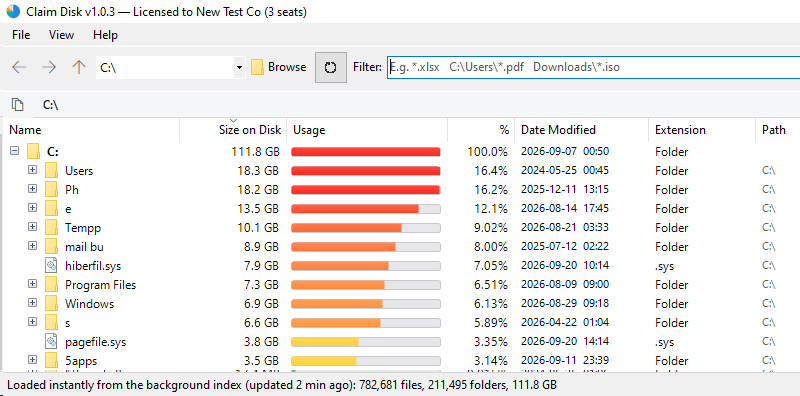
Claim Disk showing a drive sorted by size on disk, with usage bars beside each item
A drive of 782,681 files and 211,495 folders, loaded from the index rather than scanned.
The whole drive, in secondsOne pass over the file table, not folder by folder.
Ready the moment it opensThe drive index is maintained in the background and loaded at startup.
Size on disk, not guessworkExactly what deleting an item returns to the drive.
Finding files

Locate any file by name or type, in an instant

Claim Disk is not only for finding what has filled a drive. The same index answers a direct question just as quickly: where is that file, what type is it, and how many copies of it are there?
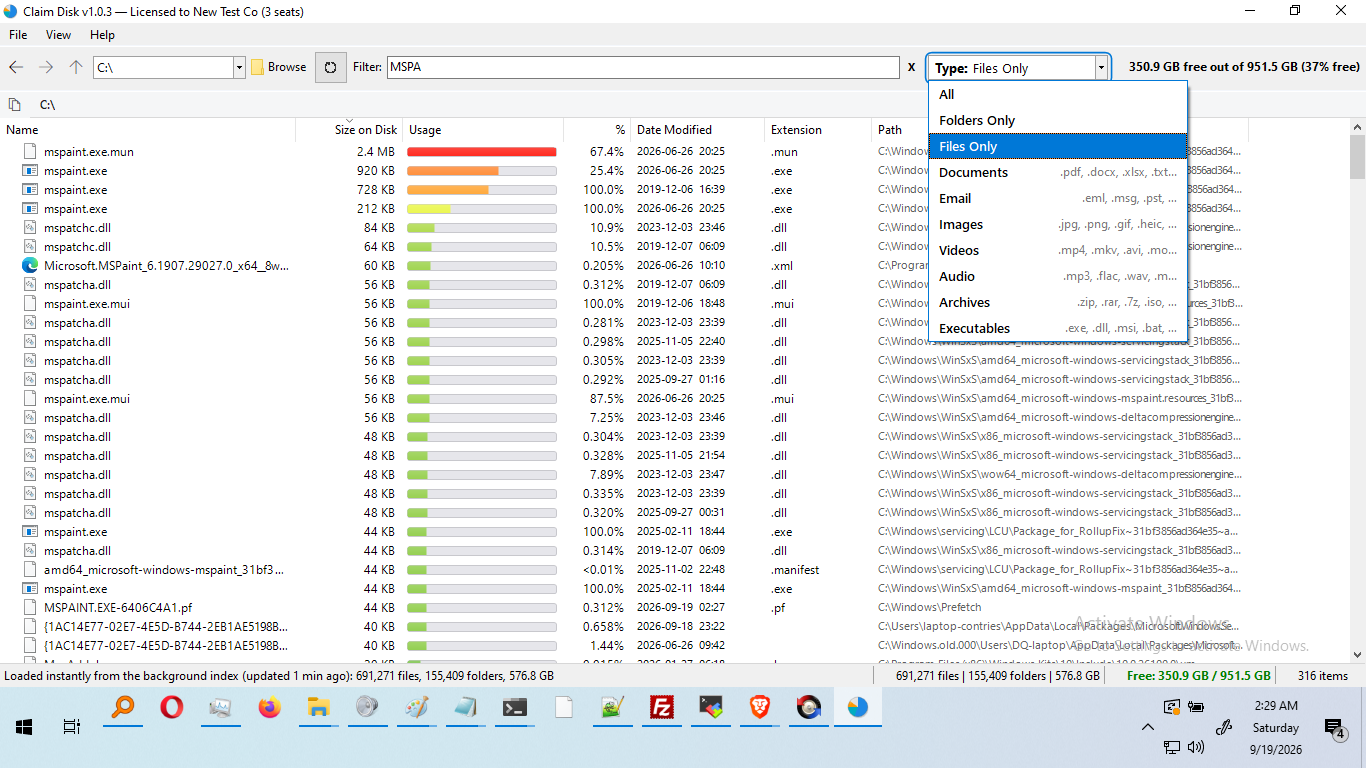
The type filter open, listing ten file-type categories and the extensions each covers
Ten file-type categories, each listing the extensions it covers — documents, email, images, video, audio, archives and executables among them.
By nameType any part of a file or folder name and the list narrows as you type.
By patternWildcards such as *.iso, report*.pdf or test??.log.
By locationPath patterns such as C:\Users\*.pdf or Downloads\*.zip.
By typeTen categories, or folders only, or files only, across the whole drive.

Every filter runs against the index already held in memory, so results appear without reading the disk again. The filter stays with you as you move between folders instead of resetting, and Locate in Tree jumps from any result straight to where it sits on the drive.

What it does

Everything you need to reclaim the space

Built on a single principle: present the result immediately, then allow it to be acted on without leaving the window.

Instant open

A background service keeps your drives indexed, so results are on screen when the application opens, and stay current as files change.

Whole-drive scan in seconds

With no index ready, the file table is read in one pass instead of folder by folder. Rows appear as they are found, and Stop keeps them.

Size on disk, not guesswork

Compressed and sparse files are counted at what they truly occupy, so the number matches what deleting actually gives back.

Nothing leaves your machine

No telemetry and no tracking. The only network traffic is license activation and a periodic license check.

Every kind of volume

Network drives, memory sticks, external drives, virtual drives and unlocked encrypted drives, each treated as the ordinary drive it appears as and read by the quickest route available.

Run it, or install it

One setup file. Install it with the indexing service, or choose Run only and start straight away with no administrator prompt.

Licensing

Free for personal use.
Licensed for organizations.

No features are withheld and nothing stops working. Personal use is free with no time limit, and organizations begin with a free two-week trial.

Home & personal

Free, forever

No license key. No time limit. No reminders.
  • Every feature, with nothing held back
  • Unlimited drives, scans and cleanups
  • Background indexing service included
  • Portable mode — run without installing
  • No account, no telemetry, no tracking
Download free for Windows
Business · Government · Non-profit

Free two-week trial

Then a one-off license per computer.
  • Fourteen days free, with no card and no sign-up
  • Perpetual licenses, which do not expire
  • Seats move between computers at any time
  • Activated once online, then valid offline
  • Volume pricing from eleven seats upward
Buy a license →
Organization licenseSeatsPrice per seat
Small organization1 to 10$19.99
Medium-sized organization11 to 49$14.99
Large organization50 and over$9.99

Perpetual and machine-bound, activated once online and valid offline thereafter.  ·  See license options and buy
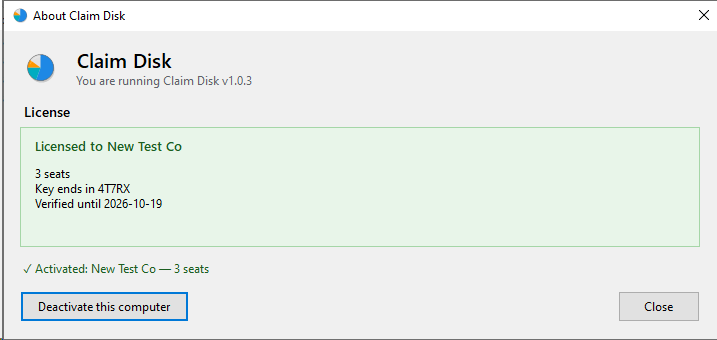
The license panel inside Claim Disk, showing the organization, the number of seats and a button to release this computer
The license panel inside the app: who it is licensed to, how many seats, and one button to release this computer’s seat for another.
Questions

Straight answers

Is it really free?
Yes — for personal and household use, with no time limit and no features held back. Organizations use it free for fourteen days, after which a license is required. Even then nothing stops working: a reminder appears every other day until a key is activated.
Why is it so much faster than other tools?
It reads the drive’s own file table in a single pass instead of asking Windows about each folder in turn, and a background service keeps an index ready between runs, so the application usually opens with the results already loaded.
Does it need administrator rights?
Only to install. With the indexing service in place, ordinary day-to-day use never prompts. The portable option runs with no administrator prompt at all.
Does it work on network drives?
Yes. Shared folders on another computer and mapped network drives are read using the standard Windows file-sharing connection, with a safeguard so that one unresponsive share cannot hold up the scan. Network locations are re-indexed on a schedule you choose, from every fifteen minutes to daily.
Does it work on encrypted volumes?
Yes. An encrypted drive that has been unlocked is treated as the ordinary local drive it appears as, including those created by TrueCrypt and VeraCrypt. Memory sticks, external drives, virtual drives and drives prepared for older versions of Windows are all handled in the same way.
Can I run it without installing?
Yes. The same setup file offers Run only, which starts the application straight away, with no administrator prompt and no changes made to Windows. If you decide to install it properly afterwards, the application will do that for you and nothing needs downloading again.
Does it send my file names anywhere?
No. There is no telemetry and no tracking. The only network traffic is license activation, a monthly license check-in, and for organizations a weekly trial check-in.
What happens when I upgrade?
An existing installation is detected and upgraded in place, keeping your license, trial status, usage type, service settings and saved index. If an upgrade fails, the previous version is restored automatically.
Free for personal use — forever

Download Claim Disk

One setup file for Windows 10 and 11. Install it, or choose Run only and start straight away. Everything it needs to run is included, so there is nothing else to download.

Version 1.0.3  ·  64-bit  ·  no account required

Operating systemWindows 10 or 11, 64-bit
Anything else to installNothing
Ways to use itInstall it, or run it without installing

Windows asks for administrator approval only if you choose to install Claim Disk. Choose Run only and it starts without asking for anything.

The rest of the family

More tools, built to the same standard

Each one does a single job properly, in the same plain language, under the same license, with no accounts anywhere.

LAN Fixer

lanfixer.com
Windows appFree for home use

Shows every device on your network in about thirty seconds, explains in plain English what is wrong, and fixes it in one click — with a link straight to your own router’s security advisories and firmware.

Visit lanfixer.com →

My PC Direct

mypc.direct
Windows appNo account

Reach your own PC from anywhere over a direct, encrypted channel between the two machines, protected by credentials you choose, with no provider or service in the middle.

Visit mypc.direct →

Map Blocker

mapblocker.com
Windows appFree for personal use

Draws every connection your PC makes on a map of the world, shows which program made it, and lets you block an address, a region or a whole country that has no business being there.

Visit mapblocker.com →

File Sender

filesender.io
Web & appNo account

Send a file straight to someone, computer to computer, with nothing stored in between. Use it in a browser, or install the app and send files of any size at all.

Visit filesender.io →

Sending Pics

sending.pics
Windows appFree for personal use

Hand a whole gallery of photos and videos to family directly from your computer, at any size, using one-time codes that expire on their own and can be revoked at any moment.

Visit sending.pics →

Header Scanner

headerscanner.com
Web toolNothing to install

Paste an email header to trace where the message really came from — every hop, by country and address — and decode what the obscure header codes actually mean.

Visit headerscanner.com →

Message Link

textme.im
Web toolNo account

Send a private message as a link that can be opened once and then disappears. Nothing is cached, and nothing is shared with anyone but the recipient.

Visit textme.im →

Insta Chat

instachat.im
Web toolNo account

Start a private conversation from a single link, encrypted in the browser rather than on a server, with no account and no registration for either side.

Visit instachat.im →

Protected Chat

protected.chat
Web toolNo account

A one-time encrypted conversation that opens from a link and leaves nothing behind when it closes. No registration, no history, no trace.

Visit protected.chat →

Free for personal use, all of them. Business, government and non-profit use begins with a free two-week trial.